Send your client the questionnaire after the contract is signed and the deposit is paid, before you start designing. It should cover the scope, budget, timeline, how the household lives, aesthetic preferences and technical constraints. Ask specific questions with preset answers to choose from, split the questionnaire into sections and let the client skip the ones that don't apply. Below you'll find the list of questions I use in my studio, and a way for the client to get through it without your help.
Why a questionnaire before an interior design project
Without a thorough interview, revisions follow. Once I didn't ask my clients whether they wanted air conditioning. I prepared the visualisation, and then the client called: "Magda, we'd also like air conditioning in the living room." I had to change the design and redo the visualisation.
That's why the questionnaire has to be comprehensive. We never know what applies to this particular client. I tried different approaches:
- a questionnaire in a document - I got brief, vague answers, because clients themselves didn't know what to choose. Sometimes they said it outright: "Magda, we ticked something, but we weren't sure";
- an interview at a meeting - to ask a client about everything, a designer needs three hours, and I've heard of designers for whom it takes as many as six. It's exhausting. I could see the clients were so tired that towards the end they'd answer anything just so we could finish;
- taking shortcuts with the questions - I started skipping questions myself, deciding that "this probably doesn't apply to them". That was a mistake too, because you never know what really doesn't apply to a client.
Why does the interview take so long? Because the client doesn't know the solutions and often isn't sure exactly what they want. If you ask whether they'd prefer a concealed or a surface-mounted mixer tap, you first have to explain how one differs from the other and answer their questions. Only then can the client make a decision.
A good questionnaire gathers everything at the start of the project. And when, halfway through, you hear "but I wanted it differently", you go back together to what the client wrote.
When to send the questionnaire to your client
After the contract is signed and the deposit is paid. First you price the project and send your proposal, the client agrees, and only then do they get the questionnaire. Earlier it makes no sense: a client won't fill in a long questionnaire if they don't yet know whether they want to work with that designer. They'll feel they're doing work before anything is agreed.
Give the client a few days. They can think it over calmly, talk to the rest of the household and attach a floor plan or photos.
What to ask your client: a ready list
This is a selection of questions from my questionnaire template. The full template has around 160 questions, some of them with photos and drawings. Most questions have preset answers to choose from, and each one leaves room for "Other" and "I don't know, I'd like your suggestions".
The basics and formalities
- Who is the main decision-maker? This avoids a situation where the husband approves the design and the wife then changes everything - or the other way round.
- What is the purpose of the project: a home for your own use, a long-term or short-term rental, a property for sale, a commercial space?
- What is the floor area of the property?
- What state is the property in: already handed over (keys received), awaiting handover from the developer, a resale property, under construction?
- When do you want to start the design work, and when do you want to move in?
- Is the property available for a measured survey?
- What materials do you have: the developer's floor plan as a PDF, an editable floor plan, photos of the current state?
- Which way do the windows face in the living room, bedroom and kitchen?
Budget
- What is the estimated total budget for fitting out the property?
- What exactly should this budget cover: renovation work, finishing materials, made-to-measure furniture, freestanding furniture, lighting, appliances and electronics, decor, the design fee?
- Which items must fit into the budget now, and which can wait?
- If you have to choose: would you rather invest in the "base" (a better floor, tiles, taps and fittings) or in the "effect" (a designer sofa, lamps, a table)?
The household and lifestyle
- How many people will live in the home: adults, children, their ages?
- Will people with special needs use the home, e.g. older people or people with limited mobility?
- How do you spend most of your time at home: cooking, TV, working from home, shared meals?
- Does anyone in the household have allergies? Do any materials need to be ruled out?
- Are there or will there be pets? What do they need: a bed, a scratching post, a litter tray, bowls?
- How often do guests stay overnight, and how comfortable should their sleeping place be?
- Do you have books, instruments, collections or sports equipment that need space?
Aesthetics
- Choose three values that are an absolute priority for you: functionality, aesthetics, storage, ease of cleaning, budget optimisation, cosiness, a "wow" effect.
- Which style is your main point of reference: minimalism, Japandi, modern classic, industrial, Scandinavian, boho, wabi-sabi, glamour, other?
- Which colour palette should dominate: light and neutral, warm and earthy, cool and modern, deep and moody?
- Which colours should be avoided at all costs?
- Are there items you'd like to display, e.g. paintings, souvenirs, a collection?
- Send inspiration images of interiors you like.
Materials
- What flooring would you like: wood, herringbone, laminate, vinyl, porcelain tiles, microcement?
- Which wall finish do you like: plain paint, wallpaper, mouldings, slatted wall panels, concrete, sintered stone?
- Which colour for metal details: chrome, brushed steel, matt black, gold?
- Which furniture fronts: profiled, matt or high-gloss lacquered, veneered, laminate?
- Which interior doors: flush, panelled, glazed, loft-style? With a standard frame or a concealed frame?
Rooms
Here the questionnaire splits into sections: kitchen, living room, bedroom, bathroom, children's room, hallway, home office. Sample kitchen questions:
- What role does the kitchen play in your home: a cooking "lab", the centre of social life, or mainly a showpiece?
- Can the current kitchen layout, e.g. the walls and plumbing or utility connections, be changed?
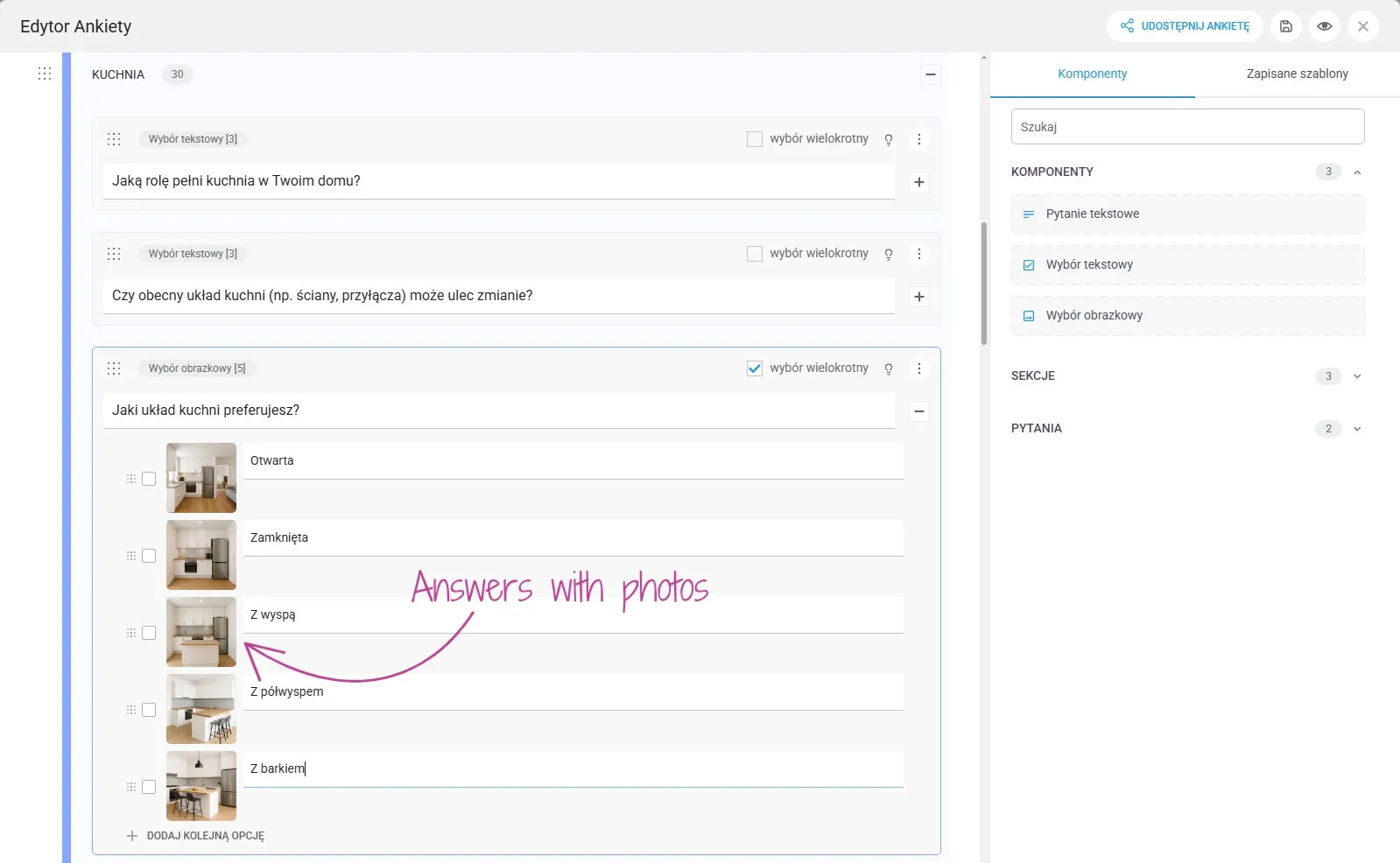
- Which kitchen layout do you prefer: open, closed, with an island, with a peninsula, with a breakfast bar?
- Should there be a place to eat in the kitchen, and for how many people?
- Drawers or cabinets with doors?
- Which small appliances will stand on the worktop every day?
- What material should the worktop and the splashback be?
- Which waste sorting system should we design in the sink cabinet?
Technical constraints and storage
- Is there, or will there be, air conditioning in the property?
- What heating system does the property have: underfloor heating, radiators, a towel radiator in the bathroom?
- Which systems are or will be installed: a smart home, an alarm, heat recovery ventilation, central vacuum?
- Do you need more power or network sockets than standard?
- Do you have a storage room in the building, a cellar or a garage?
- Where should the washing machine, dryer and ironing board go?
- Are there things you'd like to bring from your current home? If so, send photos and dimensions.
At the end, it's worth leaving one open question: "Is there anything else you'd like to share about the project?". Clients often write things there that nobody would have asked about.
How to ask so your client gives specific answers
A general question gets a general answer. Instead of "What kind of kitchen would you like?", ask:
- "Do you prefer matt, high-gloss, wooden, lacquered or other kitchen fronts?"
- "Should the kitchen be above all easy to maintain, a showpiece, with plenty of storage, or as budget-friendly as possible?"
Three things make the biggest difference in my questionnaire:
- Answers to choose from instead of an empty field. It's easier for a client to choose than to come up with something. Always add "Other" and "I don't know, I'd like your suggestions", so you don't force a decision the client hasn't made yet.
- Photos next to the answers. The client doesn't need to know how a kitchen with an island differs from one with a peninsula. They see the photos and choose.
- A short description and a price hint. Next to materials I add one sentence on what they're like, and an approximate price: $ budget-friendly, $$ mid-range, $$$ a bigger investment. The client sees straight away that a wooden herringbone floor is a different budget from laminate.
A shorter questionnaire: skipping sections and separate templates
A long questionnaire doesn't have to be tiring if the client only answers what applies to them. At the start of a section that may not apply to the project, add an opening question, e.g.:
Will children live in the home? Yes / No (skip this section)
If the client chooses "No", the whole children's room section disappears. The same goes for pets, allergies, a home office or an extra bathroom. What gets skipped is decided by the client's answer, not by the designer cutting corners.
For a different type of project, it's worth having a separate, shorter template. A rental property doesn't need a detailed interview about household routines and bedroom preferences. Questions about the standard of finish, budget, target tenants, durability of materials, ease of cleaning, number of sleeping spaces and the investor's priorities are enough. Copy the full questionnaire, remove what you don't need and save it as a separate template, e.g. "Questionnaire - Rental".
Why clients don't finish questionnaires
The most common reasons:
- the questionnaire is long and the client doesn't know how much is left;
- the questions use trade jargon - veneer, sintered stone, concealed door frame - and the client doesn't want to admit they don't know;
- they have to type long answers on a phone;
- they can't stop and come back later.
What helps: sections and a progress bar, answers to choose from, explanations of difficult terms, filling it in on a phone, dictating answers instead of typing, and being able to come back to the questionnaire another day. But what helps most is turning the form into a conversation.
A questionnaire that talks to your client: KISjusz in KIS List
The questionnaire has to be comprehensive, and the client doesn't know the solutions. That's why we created KISjusz: an AI assistant in KIS List that runs the survey with your client and educates them along the way. It isn't an ordinary form: it talks to the client, explains and, at the end, prepares a report for you.
KISjusz only asks the questions you've prepared. It follows your survey template. It doesn't make up its own questions or skip sections on its own, because it could accidentally miss something important for the project. You decide what it asks.
A template to start with. KIS List comes with my ready survey template: around 160 questions with photos and drawings. You can edit it and use it as the basis for your own. There's also a template for home stagers, prepared by Klaudia Leszczyńska.
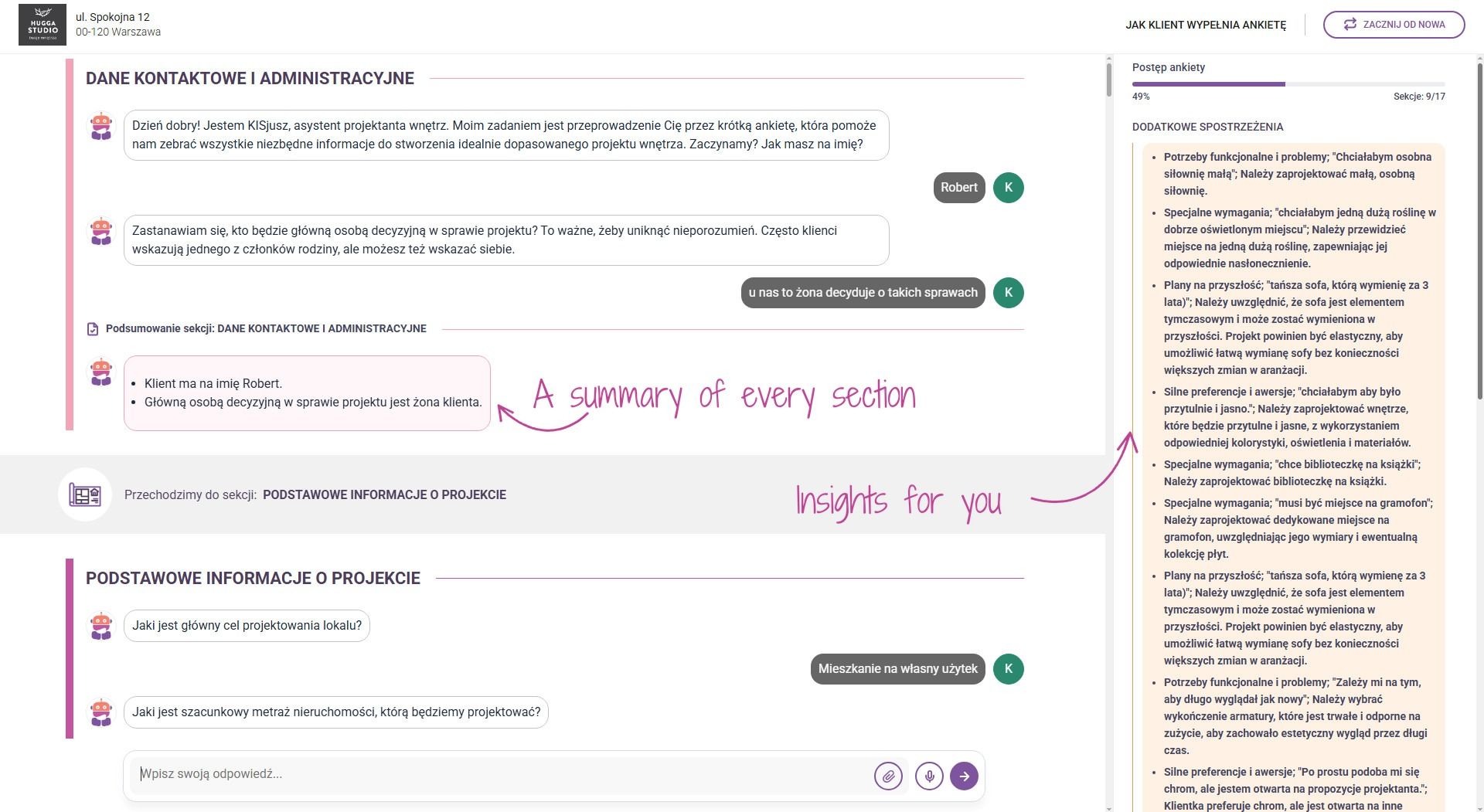
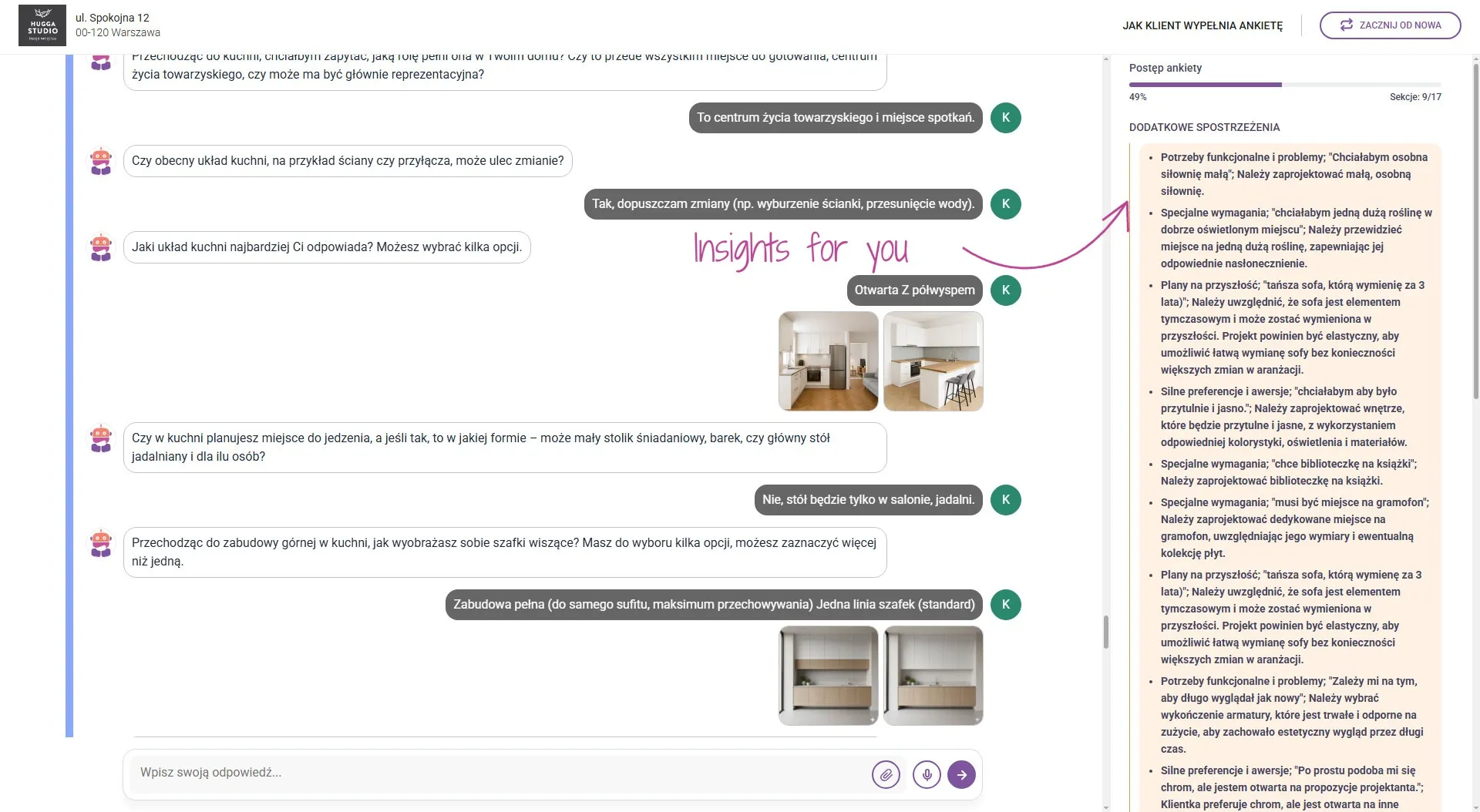
The client fills in the survey on their phone, lying on the sofa. They get a link to the survey with your studio's logo and address and open it on a phone or computer. They don't have to type anything: they can dictate their answers, as if they were talking to you. They can also add photos, a floor plan or inspiration images. They can see how many sections they've completed, and after each section KISjusz briefly sums up their answers. They don't have to go through the survey in one go - they can come back to it later.
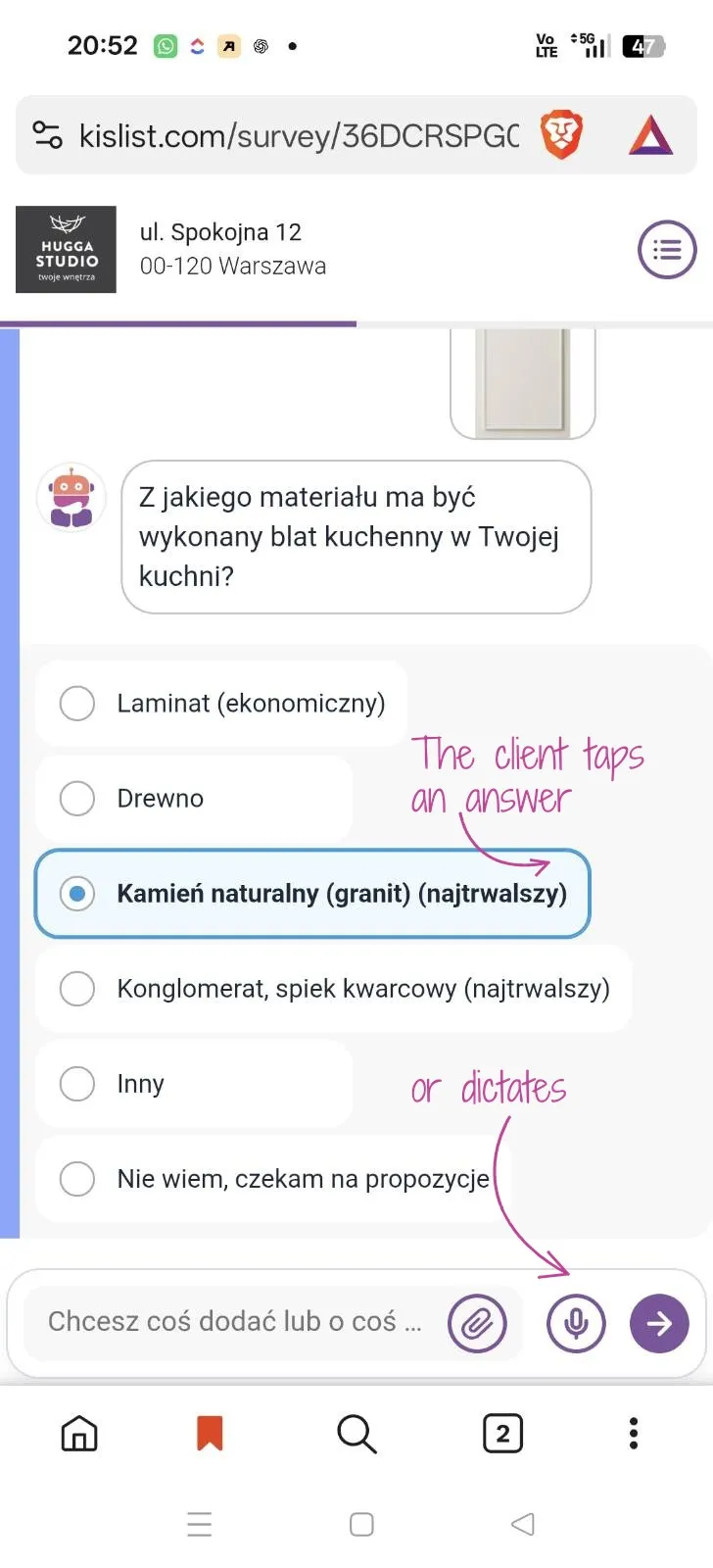
The client can ask questions. KISjusz asks what material the kitchen units should be made of. The client doesn't know how veneer differs from laminate, so they ask: which will be more durable, which works better with children or pets. KISjusz explains in plain language, and the client makes an informed decision. Without a phone call to you.
You get a summary of questions and answers, and at the end the KISjusz report. In the report KISjusz lists things the survey didn't ask about but the client mentioned along the way. For example: KISjusz asks about the sink colour, and the client replies: "I've heard white isn't practical, my neighbour complains about it a lot." KISjusz will note that the client has bad associations with a white sink, so that you pay attention to it. Or the client mentions they'll buy a cheaper sofa that they'll replace in three years - in the report you'll find the conclusion that the design should let them replace the sofa without changing the whole scheme.
The insights are grouped: functional needs and problems, special requirements, plans for the future, strong preferences and aversions. These are the things that get lost in an ordinary form or only come up at the concept stage.
How to prepare your client
Before you send the link, write the client a few sentences. For example:
"The survey will be run by KISjusz, an AI assistant. Its job is to help you fill in the survey, which will give me the information I need for the project. You can fill it in on your phone, whenever suits you. You don't need to type anything - you can dictate your answers. If you have any questions at all, please ask - KISjusz will explain how materials, solutions or terms differ, so that you can make an informed decision. You don't need to know any trade terms."
The client then knows what to expect and is more willing to use the conversation.
Word, Google Forms or an AI assistant
| A Word document | An online form | An AI assistant (KISjusz) | |
|---|---|---|---|
| Cost | no extra cost | usually free | in KISjum, a paid AI add-on |
| Answers to choose from and photos | by hand, hard to read on a phone | yes | yes |
| Skipping sections | no | depends on the tool | yes, with a "skip this section" question |
| Explaining terms to the client | no | no | yes, in the conversation |
| Dictating answers | no | no | yes |
| Summary for the designer | you put it together yourself | a table of answers | a report with additional insights |
Simple tools are free and are enough if the client knows the trade terms and likes forms. With a long questionnaire and a client furnishing a home for the first time, the client is left alone with them. An AI assistant guides them through the questions and picks up what a form won't record.
Frequently asked questions
How many questions should a client questionnaire have?
As many as you need for the project, but the client should only see the ones that apply to them. My template has around 160 questions, and thanks to skipping sections a client with no children, no pets and no home office won't see a large part of them. For rental properties, it's better to prepare a separate, shorter template.
When should you send the questionnaire to your client?
After the contract is signed and the deposit is paid. Before the contract, a client usually doesn't want to spend time on a long questionnaire, because they don't yet know whether they'll be working with you.
What data shouldn't you collect in the questionnaire?
In line with the GDPR data minimisation principle, ask only for what the project needs, e.g. a first name. Collect formal details, such as a billing address or a national ID number, at the appropriate stage of the collaboration, outside the questionnaire. The questionnaire is for getting to know the client's needs, lifestyle and preferences.
Is data in KISjusz secure?
KIS List uses only closed, enterprise AI APIs. Client data isn't used to train public AI models, and all data in the system is encrypted.
How much does KISjusz cost?
KISjusz works in KISjum, an AI add-on you can add to any KIS List plan: START, PRO or EXPERT. KISjum costs €24 net a month for your whole team and includes an AI budget for KISjusz and KISaya, the visualisation enhancer. You can try KIS List free for 14 days, no card needed. To start, you get a micro AI budget for testing KISjusz and KISaya. It may run out before the trial ends.
You guide the client through the process, not through hundreds of messages
A good questionnaire is the first step to you leading the project, rather than answering questions forever. Send your client specific questions, let them skip what doesn't apply, and give them someone who will explain difficult terms. Let them fill in the questionnaire on their phone, in a spare moment, dictating their answers. Try KIS List free for 14 days, no card needed: the ready survey template is waiting, and you can test KISjusz with the micro AI budget you get to start.